
AI Home Design Interior DECOZY
LeoStudio Global Ltd.Art & Design
4.6205.00 Reviews
- Version
- 1.3.9
- Installs
- 100.00K
- Age Rating
- Everyone
Screenshots


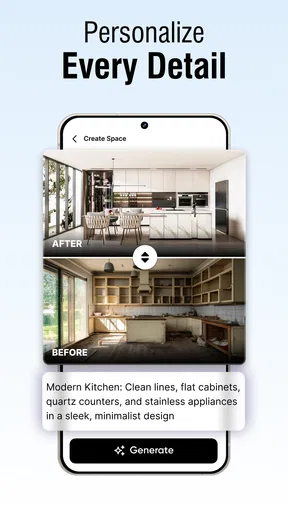
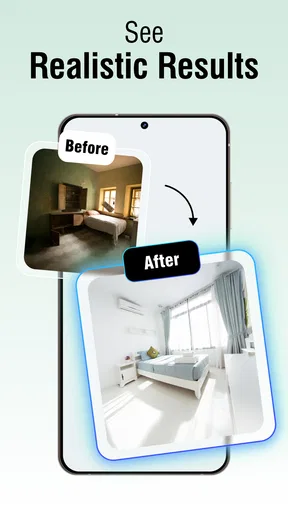
Our Review of AI Home Design Interior DECOZY
 Analysis by Appyee
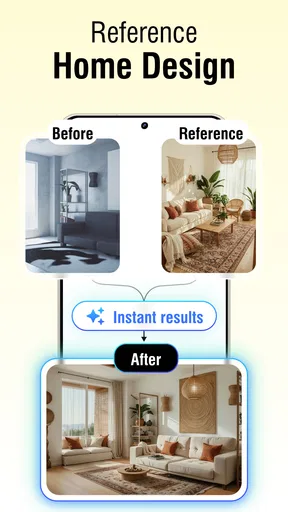
I tried AI Home Design Interior DECOZY as a quick way to turn an ordinary room photo into a more considered decorating direction, and my first impression was that it understands the appeal of speed. Instead of opening a full interior-design program, measuring every wall, and building a room from scratch, I could begin with the space I already had, choose a visual direction, and see an AI-generated makeover. That makes it especially approachable for someone who wants ideas before spending money or moving furniture.
DECOZY is a free home design app from LeoStudio Global Ltd. in the Art & Design category. It is aimed at everyday visual planning rather than professional architectural work, and that distinction matters throughout the experience. I found it most useful as an inspiration and decision-making tool: it helps me imagine possibilities, compare moods, and identify a style worth exploring. It is less suitable when I need construction-ready accuracy, exact product matching, or a dependable floor plan.
The app has a 4.6 average from around 6.7 thousand ratings, with more than 100 thousand installs. Those figures suggest that its simple room-makeover idea has found an audience, but I would still approach each generated image as a design suggestion rather than a promise of how my actual room will look. AI can create a convincing visual while quietly changing proportions, materials, windows, or furniture placement.
From an ordinary room photo to a usable decorating direction
I find the useful test comes after the first striking makeover: can I turn its visual idea into one practical next step? I’d note what seems to create the biggest change—perhaps a calmer palette or a clearer furniture arrangement—then check that idea against the room’s measurements and daily routines. That keeps the image helpful without mistaking an attractive proposal for a ready-made plan.
Starting with the room I actually have
The most important part of the workflow happens before the app generates anything. A clean, useful starting image gives DECOZY a better chance of producing an image that feels connected to the room. I would take the photo in daylight, stand far enough back to include the main walls and floor, and avoid covering important features with people, bags, or temporary clutter. A crooked or very dark image can make the result feel like a completely different space.
This is where the app differs from a blank-canvas interior tool. I am not asked to know the exact dimensions of the room before I begin. I can start from a familiar setting: a living room that feels cold, a bedroom that needs a calmer atmosphere, or a dining area that looks unfinished. That low barrier is a genuine strength for renters and first-time decorators who want to explore without learning specialist software.
There is also a useful mental shift here. I do not treat the uploaded photo as a final measurement document. I treat it as a visual brief. If the sofa is too large for the room, the app may still show a beautiful arrangement with a smaller-looking sofa. If a doorway is awkwardly placed, the generated image may soften or ignore that constraint. The better question is not “Can I copy this exactly?” but “What idea in this image can I realistically borrow?”
Choosing a style without losing the room’s purpose
After the image is ready, the style choice becomes the main creative handoff. This is not simply about picking a look that photographs well. I would first decide how the room needs to function. A family living room needs durable, practical choices; a home office needs visual calm and usable light; a small bedroom may benefit more from a sense of openness than from decorative detail. The generated style is more helpful when it answers that practical need.
For a realistic everyday scenario, imagine that I am preparing a rented apartment before a friend visits. The walls cannot be repainted, the budget is limited, and I am unsure whether warm wood, softer lighting, or a simpler furniture arrangement would make the biggest difference. I could upload the current living-room photo, choose a style close to the atmosphere I want, and use the result to narrow my shopping and rearranging plans. The value is not that DECOZY makes the purchase for me; it gives me a visual target.
I recommend generating with a clear intention instead of chasing the most dramatic image. If I want a calmer room, I should judge whether the result reduces visual noise. If I want a more welcoming room, I should look at the seating arrangement and balance of colors. If I am considering a style only because it looks impressive in a preview, I may end up with a room that does not suit my habits.
Reading the makeover as a proposal, not a blueprint
The generated room is the point at which the app feels most satisfying. A familiar space can suddenly look brighter, more coordinated, or more intentional. This is where DECOZY delivers something traditional mood boards often cannot: a direct visual connection between my own room and a possible new atmosphere. Generic inspiration images can be beautiful, but they do not show how an idea might relate to my existing walls, windows, and furniture.
At the same time, I found it important to inspect the image in layers. First I look at the overall mood. Then I check the large furniture pieces, walking paths, windows, doors, and storage. Finally I examine small details such as lamps, artwork, plants, and surface textures. The small details can make the image feel realistic while the larger arrangement may be impractical. This three-pass check is one of the best ways to avoid being persuaded by a polished but unusable result.
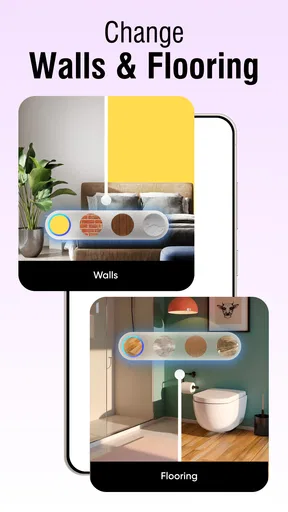
A second useful technique is to separate “keep,” “change,” and “research.” I might keep the existing floor, change the wall color through removable decoration, and research a similar lamp or rug. This prevents the common mistake of treating every element in the AI image as something that must be bought. The app is strongest when it helps me identify a direction and a few high-impact changes, not when I copy the entire scene.
The handoff from digital idea to real room
DECOZY’s most meaningful handoff is from the generated image to a practical plan. I would save the visual reference, write down the changes that seem achievable, and then compare them with the room itself. Before buying anything, I would measure the furniture, check the position of outlets and radiators, and confirm that doors and drawers can open. The app can suggest a visual arrangement, but those physical checks remain my responsibility.
This is also where a phone-based design app compares favorably with a professional service in one narrow situation: early exploration. If I am not ready to pay for a consultation and do not yet know what I like, a quick AI preview helps me arrive at a more focused question. I can show a decorator the atmosphere I prefer, or use it to explain why I want warmer materials rather than simply saying that the room feels dull.
Compared with a conventional mood-board app, DECOZY offers a more personal starting point because the room photo remains central. A mood board is usually better for collecting exact references, finishes, and products, while DECOZY is better at showing a broad transformation. Compared with a room-planning tool based on precise dimensions, it is faster and more visually immediate, but less dependable for fitting furniture and checking clearances. I see it as the first stage between “I dislike this room” and “I know which changes to investigate.”
What I would do after seeing a promising result
If the makeover looks convincing, I would resist changing everything at once. I would identify the two or three elements that create most of the effect: perhaps the color balance, the lighting mood, and the placement of one large piece. Then I would test those ideas in the real room in a reversible order. Rearranging furniture costs little, while buying a large rug or replacing a light fixture deserves more care.
One non-obvious benefit is that the app can help reveal a preference I had not named. I may think I want a “modern” room, but after comparing a few visual directions I may discover that I actually prefer less furniture, warmer colors, or stronger contrast. That discovery is more valuable than a single attractive image because it improves later decisions in stores, catalogs, and conversations with a designer.
Another practical use is preparing for a shared decision. If two people disagree about a room, discussing abstract words such as “cozy” or “minimal” can go in circles. A generated makeover gives both people something concrete to react to. We can point to the amount of open floor, the color temperature, or the level of decoration and decide what works. The image does not settle the argument, but it makes the disagreement more specific.
Where the workflow becomes less reliable
The flow breaks when I expect the app to understand constraints that are not obvious in a single image. A photo may not show the full wall, the storage behind the camera, the uneven floor, or the route needed to carry furniture into the room. A generated design can therefore look coherent from one angle while failing in the rest of the space. For a serious renovation, I would use a measured plan and professional advice alongside the app.
It can also be frustrating when the AI changes an important feature instead of working around it. A distinctive window, built-in cabinet, sloped ceiling, or fixed appliance may be visually altered in the result. That does not make the image useless, but it changes how I interpret it. I would extract the color palette, lighting idea, and general arrangement rather than assume that every architectural detail has been preserved.
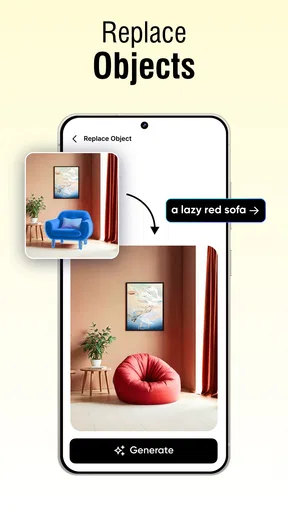
There is a similar limitation with shopping. A realistic-looking chair or lamp in the image should not be treated as a guaranteed product recommendation. The visual may represent a type of object rather than an item I can identify and purchase. If my main goal is finding exact products within a strict budget, a retail-focused tool or a manually assembled reference board may be more efficient.
The app is free to download and use as an accessible starting point, but in-app purchases range from $2.99 to $69.99 per item. That makes it sensible to explore the basic workflow first and decide whether the extra value fits my needs before paying. I would be particularly careful if I only need one quick idea for a single room, because a full-featured paid path may be harder to justify than it is for someone repeatedly planning several spaces.
Who should use it, and who should choose something else
I would recommend DECOZY to renters, homeowners, students, and anyone who can recognize a room problem but struggles to visualize a solution. It is also useful for people who want to compare broad styles before committing to paint, furniture, or décor. The Everyone content rating makes it suitable as a general household design tool, and the minimum operating-system requirement is Android 8.0 or later, which keeps it available to many older devices.
I would be more cautious about recommending it to an interior professional who needs accurate client presentations, or to someone planning structural work. It is not the right first choice when the central question is whether a particular sofa physically fits, how many tiles are required, where wiring should go, or whether a wall can be removed. In those cases, measurement-based planning and expert review matter more than a realistic visual makeover.
Device performance and image quality can also affect the experience. A high-quality room photo gives the AI more useful visual information, while a compressed, cluttered, or poorly lit image leaves more room for interpretation. I would prepare several views when possible, but I would still judge each output as an individual concept rather than assuming that one result represents the full room.
Everyday value after the novelty fades
The novelty of seeing a room transformed is immediate, but the app’s lasting value depends on whether I use the images to make better decisions. The strongest workflow is deliberately modest: photograph the room, choose a direction that matches its purpose, study the result for transferable ideas, verify the physical constraints, and make one reversible change before spending heavily. That approach turns AI from a decoration generator into a planning aid.
I also like that the app can shorten the awkward early stage of a project. Usually, I need to browse many unrelated images before I can explain what I want. Here, the room itself provides the starting point. Even when the output is imperfect, it can show me what feels wrong: too much furniture, too little contrast, an overly cold palette, or a style that overwhelms the space. That feedback helps me refine the next attempt or move to a different design method with clearer priorities.
The current version is 1.3.9, and I would keep expectations grounded because AI design tools can evolve quickly. My recommendation is based on the workflow it offers now: upload a room, explore a style, inspect the proposed makeover, and translate only the useful parts into a real plan. I would not use it as a substitute for measurements, product research, or professional design judgment.
Overall, AI Home Design Interior DECOZY is a worthwhile free starting point for visual experimentation. Its real strength is turning uncertainty about a familiar room into a concrete conversation about what could change. I would recommend it to a friend who wants inspiration without the intimidation of a full design program, especially before shopping or requesting a consultation. I would skip it when precision, exact products, or construction decisions are the priority. Used with that boundary in mind, it offers a quick and enjoyable bridge from an ordinary room photo to a more confident decorating direction.
Verdict
Strengths of AI Home Design Interior DECOZY
- Quickly generates interior concepts from room photos.
- Useful for exploring different décor styles before renovating.
- Simple interface suitable for users without design experience.
- Provides visual inspiration for furniture, colors, and layouts.
- Can help communicate renovation ideas to contractors or designers.
Limitations of AI Home Design Interior DECOZY
- AI results may distort room proportions or architectural details.
- Some designs can look generic or repetitive.
- Furniture shown may not be available or accurately identified.
- High-quality generations may require in-app purchases or credits.
- Results depend heavily on clear, well-lit photos.
Other Releases by LeoStudio Global Ltd.
View All
Star Gazer - Astronomy Sky Map
Education4.6

Smart Remote For Vizio TV
Tools4.6

Car Play Connect for Android
Auto & Vehicles4.3

People Finder AI Deep Search
Lifestyle3.9
Similar Picks in This Category
View All
Canva: AI Photo & Video Editor
Canva4.8

PENUP – Drawing-sharing SNS
Samsung Electronics Co., Ltd.4.5

Crafto
Kutumb App4.6

Sketchbook
Sketchbook4.1

ibis Paint X
ibis inc.4.5

Adobe Express: AI Photo, Video
Adobe4.6
Frequently Asked Questions
What is AI Home Design Interior DECOZY?
AI Home Design Interior DECOZY is an interior-design app that uses artificial intelligence to help you visualize room makeovers. You can upload or select an image of a space, choose a room type or decorating style, and generate design concepts with different furniture, colors, layouts, and decorative elements. It is intended for inspiration and planning rather than replacing professional architectural or construction advice.
How does DECOZY create interior design ideas?
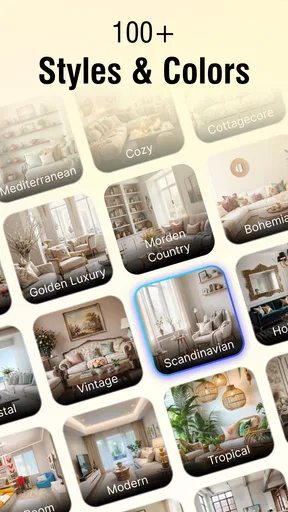
DECOZY generally works by analyzing a room image or design request and applying an AI-generated style to it. Depending on the available tools, you may be able to select categories such as living room, bedroom, kitchen, or office, then experiment with styles including modern, minimalist, Scandinavian, luxury, or rustic. Results can vary, especially when photos are dark, cluttered, cropped, or taken from unusual angles.
Is AI Home Design Interior DECOZY free to use?
The app may offer free design generations or basic features, while additional styles, higher-quality results, unlimited projects, or faster processing can require in-app purchases or a subscription. Before downloading or starting a trial, check the current pricing, renewal terms, and cancellation instructions shown in the App Store or Google Play listing. Trial offers can automatically become paid plans if not canceled in time.
Can I use DECOZY designs to remodel my real home?
You can use the generated images as visual references when planning furniture, colors, layouts, and decorative themes, but the results should not be treated as precise renovation plans. AI images may show unrealistic dimensions, unsuitable materials, blocked doors, or furniture that does not fit your room. Always measure the space yourself and consult an interior designer, contractor, or qualified professional before making structural or electrical changes.
What should I know about privacy when uploading room photos?
Before uploading personal room images, review DECOZY’s privacy policy and the permissions requested by the app. Check whether photos are stored, processed by third-party AI services, used to improve models, or deleted after generation. Avoid including people, children, addresses, documents, or other sensitive information in images. You should also confirm whether the app allows you to delete uploaded content and account data.
